
Introduction
Proper documentation of Microsoft 365 architecture is essential for successful implementation, management, and scalability. Engineers and architects need to create descriptive documentation that accurately reflects both current and future infrastructures. While each organization's implementation may have unique elements, having standardized templates with common infrastructure components provides an invaluable starting point for planning and communication.
This guide explores the key components of Microsoft 365 logical architecture, offering best practices, implementation strategies, and visual templates to help IT professionals effectively design, document, and manage their Microsoft 365 environment.
The Problem: Complexity in Modern Cloud Architecture
Organizations migrating to or optimizing Microsoft 365 face several significant challenges:
- Integration Complexity: Microsoft 365 encompasses multiple services that must be properly integrated, including Exchange Online, SharePoint Online, OneDrive for Business, Teams, and various security services.
- Security Architecture Design: Organizations need to design security architecture where every access attempt, whether on-premises or cloud, is treated as untrusted until verified, following the "never trust, always verify" approach. This Zero Trust model has become essential in modern security design.
- Hybrid Environment Management: Many organizations operate in hybrid environments where on-premises systems must coexist and integrate with cloud services, adding complexity to the architectural design.
- Governance and Compliance: Microsoft 365 must be configured to meet various compliance standards, requiring careful architecture planning to ensure data protection, encryption, and proper access controls.
- Documentation Challenges: IT teams often struggle to create clear, comprehensive, and standardized documentation that accurately represents the implemented architecture and can evolve with the environment.
Solution Options
1. Standardized Architectural Documentation
Microsoft provides official architecture icons, stencils, and templates to help create standardized Microsoft 365 architecture diagrams in Visio. These resources enable IT professionals to:
- Use consistent visual elements across documentation
- Clearly communicate design decisions and relationships between components
- Align with Microsoft's standards and best practices
- Create both high-level and detailed architectural views
These resources can be accessed through the Microsoft 365 solution and architecture center, which serves as a comprehensive hub for architectural guidance.
2. Zero Trust Security Architecture
When designing Microsoft 365 architecture, security should be a foundational element:
- Implement identity based security perimeters that verify every access attempt
- Design security architecture that treats all access attempts as untrusted until verified
- Integrate cloud controls to protect user identities while controlling access based on risk levels
- Establish partnerships between operations, governance, and security teams early in the design process
3. Logical Architecture Components
A comprehensive Microsoft 365 logical architecture should include:
Identity and Access Management
- Microsoft Entra ID (formerly Azure AD) configuration
- Authentication methods and conditional access policies
- MFA implementation strategy
Collaboration Services
- Microsoft Teams as the central hub for productivity services
- SharePoint and OneDrive configuration and integration
- Exchange Online and email services architecture
Security and Compliance
- Data loss prevention strategies
- Information protection and governance
- Encryption options for data at rest and in transit
- Audit logging and monitoring configuration
Network Configuration
- Network interface management for cloud services
- Connection models for hybrid environments
- Traffic routing and security considerations
Best Practices for Microsoft 365 Architecture Design
Implementing and maintaining an effective Microsoft 365 architecture requires adherence to several best practices that ensure security, efficiency, and scalability. These practices help organizations maximize their investment while minimizing potential risks.
Security Best Practices
- Implement Zero Trust Architecture Adopt a security architecture where every access attempt, whether on-premises or cloud, is treated as untrusted until verified, following the "never trust, always verify" approach. This is critical for protecting identities and controlling access to valuable resources based on user risk level.
- Establish Multi-layered Security Controls Deploy comprehensive security measures including encryption for data in transit using Transport Layer Security (TLS), regular security awareness training for employees, and routine audit log reviews to monitor user activities within your Microsoft 365 environment.
- Implement Regular Update Policies Keep all software components current with updates to patch newly discovered vulnerabilities and protect against the latest cyber threats. Regular updates maintain functionality and strengthen your overall security posture.
- Use Microsoft Secure Score Integrate with Microsoft Secure Score to measure your organization's security posture against best practices. This tool offers recommendations for improving your security and can significantly enhance your defenses when followed.
Architecture Design Best Practices
- Plan for Hybrid Environments When designing SharePoint and related services, take advantage of host-named site collections, which is the same architecture that Office 365 uses natively. This approach provides better scalability and reduces resource consumption while planning for potential future hybrid scenarios.
- Implement Centralized Governance Reduce risks and complexity by following established best practices and standards for security, compliance, and governance. A centralized approach ensures consistent implementation across the organization.
- Design for Scalability Create an architecture that can grow with your organization's needs. This includes planning for increased user counts, data storage requirements, and additional workloads.
- Prioritize User Experience Improve user adoption and satisfaction by delivering solutions that meet business requirements and end-user expectations. A well-designed architecture should facilitate, not hinder, user productivity.
- Document Everything Maintain comprehensive documentation of your architecture, including diagrams, configuration settings, and decision rationales. This documentation should be updated regularly as the environment evolves.
Conclusion
Effective Microsoft 365 logical architecture documentation is crucial for successful implementation and management. By utilizing standardized templates, following security best practices, and comprehensively documenting all components, organizations can create a solid foundation for their cloud environment.
The Microsoft 365 solution and architecture center provides access to tools, templates, and guidance that help IT professionals save time and resources by using proven solutions aligned with Microsoft's vision and roadmap. These resources help reduce risks and complexity while improving user adoption and satisfaction.
By implementing the automation workflows described above, organizations can further enhance the value of their Microsoft 365 environment, improving efficiency, reducing manual effort, and ensuring consistency across processes.
Remember that architecture documentation should be treated as a living document, updated regularly to reflect changes in the environment and incorporate new best practices as Microsoft 365 continues to evolve.
Next Steps
Take the next steps to improve your Microsoft 365 architecture documentation:
- Contact us to assist or make addition recommendations in your architecture design.
- Access official resources: Visit the Microsoft 365 solution and architecture center to download official templates and icons.
- Evaluate your current architecture: Review your existing documentation against the components outlined in this guide, identifying gaps and areas for improvement.
- Implement security best practices: Ensure your architecture incorporates Zero Trust principles and modern security controls.
- Create standardized diagrams: Develop visual representations of your architecture using Microsoft's templates to improve communication and understanding across teams.
- Share your knowledge: Contribute to the community by sharing your experiences and best practices with other IT professionals implementing Microsoft 365.
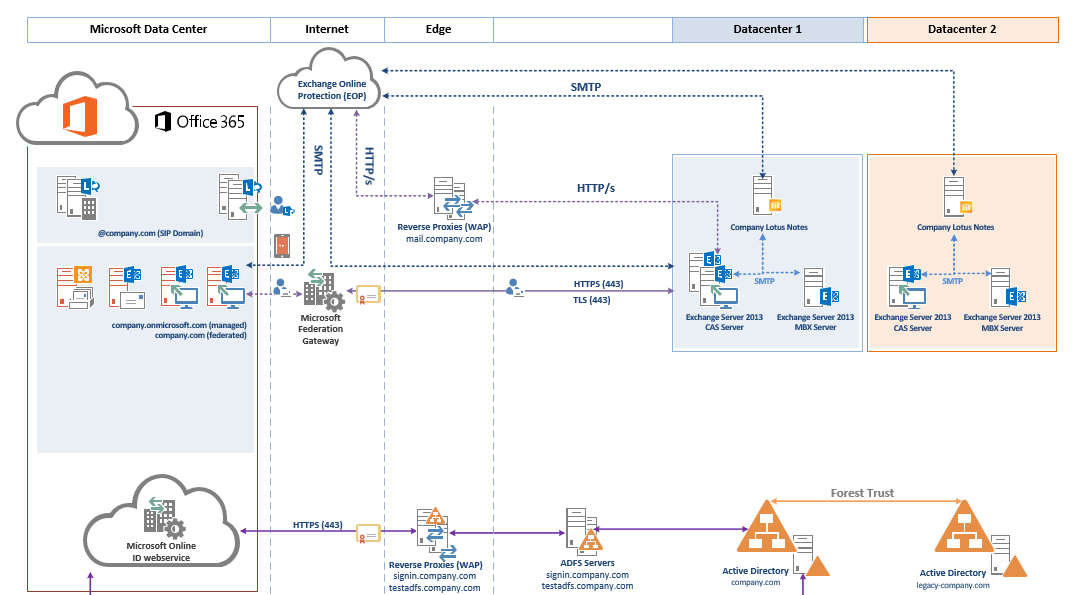
- Download our logical architecture template.
By following these steps, you'll be well on your way to developing comprehensive, accurate, and valuable documentation of your Microsoft 365 logical architecture.
Share this article
Help others discover this content
Need Help Implementing This Solution?
Schedule a free 30-minute consultation to discuss your specific Microsoft 365 or Azure needs.
Schedule Free Consultation

